


Nice G.O.
4.6284.00 Reviews
App Specs
- Version
- 1.1.11
- Updated On
- License
- Free
- Downloads
- 10,000+
- Developer
- Nice North America LLC
- Categories
- House & Home
- Platform
- Android
Screenshots
 Analysis by AppCompare
Opening a garage door from a phone sounds like a small convenience, but it becomes surprisingly useful once it fits into a repeatable routine. I found that Nice G.O. is most valuable when I stop treating it as a novelty and use it as a simple access-control tool: check the door before leaving, open it for someone when I am away, and close it without walking back outside to confirm. It is a free House & Home app from Nice North America LLC, aimed at mobile access and control of compatible garage doors.
Nice G.O. is not trying to replace every smart-home system in your house. Its focus is narrower, and that is part of its appeal. The app is built around the garage door, so the experience feels more direct than using a broad home-automation platform where the same action may be buried among lights, cameras, thermostats, and routines. If your main need is dependable phone-based garage access, that focused approach makes sense.
How the everyday garage-door workflow feels
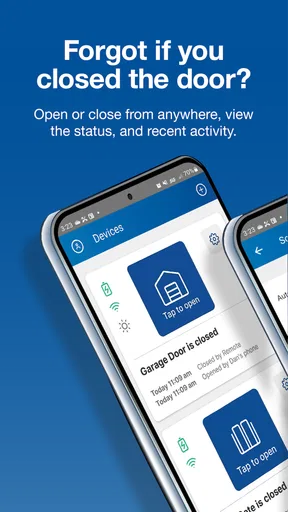
The most useful starting point is a basic habit: open the app when you are leaving or arriving, check the current door status, and use the control when needed. That sounds obvious, but the status check matters more than the button itself. A remote control lets me send an instruction, while a phone-based interface can help me confirm whether I actually need to send one. That distinction is useful when I am already in bed wondering whether the garage was left open.
A realistic example is a busy morning. I can leave the house, pull away, and use the app to make sure the garage door is no longer open. If I notice it is still open, I can deal with it without turning around. The same workflow works when a family member is expecting a delivery inside the garage or when a visitor needs access while I am not at home. The benefit is not that pressing a button is difficult; it is that the phone is usually already with me.
I also like the separation between the physical remote and the app. A remote is excellent when it is in the car, but it is easy to forget, lose, or leave with another household member. The app gives me another way to manage the door from the device I carry throughout the day. That makes it especially practical for people who regularly walk, use a bicycle, travel between vehicles, or need to coordinate access remotely.
There is an important practical condition, though: the app is only useful when the garage-door setup is compatible and connected properly. It is not a universal replacement for every opener. Before building a routine around it, I would confirm that the existing Nice system supports the app and that the installation is configured correctly. That is a better first step than assuming any garage motor can be added simply because the app is available.
The interface is best judged as a control surface rather than a complete home dashboard. I do not expect it to manage unrelated devices, and I would not choose it for that purpose. Its strength is keeping the garage action close at hand. For someone who wants one dedicated tool instead of a large smart-home ecosystem, that narrower scope can reduce clutter and make the important control easier to find.
Worth Reading Before You Choose

EA SPORTS FC Mobile 26 Is a Bigger Football Game, but It Takes Time

Flipboard Shows What News Apps Must Do Beyond the Feed

Switching to Android Auto Means Rethinking Your Driving Routine

Google Calendar Makes a Crowded Week Easier to Manage

Ludo King Makes the Most of the Minutes Between Plans

Baby Panda World Brings Quick Play to Modern Phones, but Its Game Library Feels Busy
Build a routine around confirmation, not just control
My preferred habit is to use the app at transition points: leaving home, arriving home, going to sleep, and handing access to another person. These moments are easier to remember than random checks during the day. The routine also reduces accidental toggling because I am using the control with a clear purpose rather than tapping it while distracted.
Another useful habit is to pause after sending a command and verify the resulting status. A garage door is a physical device, so a tap and a completed movement are not necessarily the same thing. If the app presents the door state, I treat that state as the final confirmation. This is more reliable than closing the app immediately after pressing the control and assuming everything happened exactly as intended.
That approach also helps when network conditions are imperfect. If the response feels delayed, I avoid repeatedly tapping the control. Multiple attempts can create confusion about which command was accepted. Instead, I wait briefly, check the displayed state, and then decide whether another action is necessary. This is a small workflow improvement, but it is the kind of discipline that makes remote access less stressful.
Settings and account details worth checking first
My first setup pass would be deliberately unhurried. I would verify the correct garage door, make sure the app reflects the real physical state, and test control while standing nearby before relying on it from a distance. A nearby test makes it easier to identify a setup problem without wondering whether the issue is the phone, the connection, or the opener itself.
I would also check the app after installation rather than assuming the default arrangement is ideal. Look for the available door-status information, notification choices, and any account or access settings that affect how the household uses the system. The exact options can depend on the connected equipment and app release, so I would only enable controls that match the way I actually manage the garage.
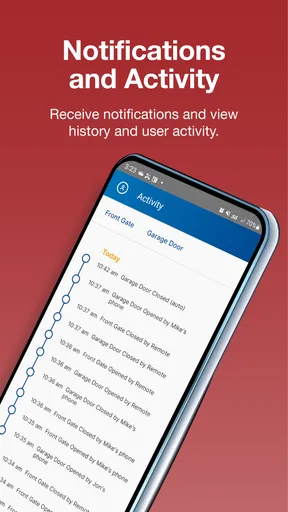
Notifications deserve particular attention. A notification can be helpful when I need awareness of a door event, but too many alerts quickly become background noise. My preference is to keep alerts meaningful enough that I will notice them. If the app offers a choice between frequent updates and more selective messages, I would choose the latter unless there is a specific reason to monitor every change.
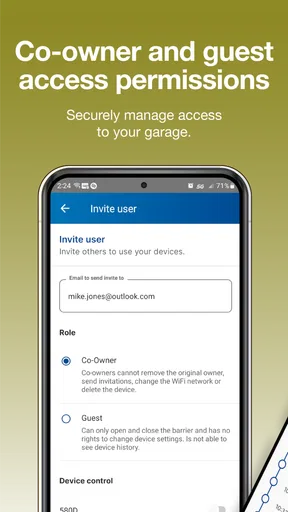
Shared access is another area where a little planning helps. If several people use the garage, I would decide who genuinely needs mobile control instead of giving access casually. The app is more useful when each person understands the same basic rule: check the state before acting, and do not assume that a command has completed without confirmation. This is less about advanced technology and more about avoiding conflicting actions.
I would keep the app updated as well. The current version is 1.1.11, and the app requires Android 10 or later. That makes the platform requirement fairly important for anyone using an older Android phone. On iOS, I would still check the device’s compatibility in the relevant store before depending on the app, particularly if the phone has been kept on an old operating-system release.
The app is free, which lowers the barrier to trying it, but “free” does not remove the need for compatible garage hardware and a sensible setup. The cost question is therefore less about the download and more about whether the existing Nice installation can provide the connected access the app expects. I would not buy or replace equipment solely on the assumption that the app alone creates smart control.
Because this is a home-access tool, I would also treat the phone itself as part of the security chain. A screen lock, updated operating system, and careful handling of account credentials are basic but worthwhile safeguards. The app can make access more convenient, but convenience should not mean leaving the phone unlocked or sharing account details through informal messages.
Where the app is stronger than a conventional remote
The physical remote remains faster in one narrow situation: when I am already sitting in the car and the remote is within reach. It does not require me to unlock a phone or wait for an app to load. For that reason, I see Nice G.O. as a complement rather than an automatic replacement. Keeping the remote available can be sensible, especially for household members who prefer a dedicated button.
The app becomes more valuable outside that narrow situation. I can use the phone while away from the car, which changes how I handle deliveries, visitors, forgotten doors, and family coordination. A remote cannot help much when it is inside the house and I am already across town. The app’s advantage is reach and visibility, not necessarily speed for every arrival.
Compared with a broad smart-home platform, the focused design may also be easier for a household to understand. Someone who only needs garage access does not have to learn a full collection of automations. On the other hand, users who already manage their garage alongside cameras, alarms, lights, and locks may prefer a single ecosystem if their existing setup supports that integration. Nice G.O. is the better fit when dedicated garage control matters more than having every device in one dashboard.
Faster patterns for experienced users
Once the basic workflow is reliable, I would make the app easier to use by placing it where it is natural to reach. A home-screen shortcut or an equivalent quick-access arrangement can remove unnecessary searching, provided the phone supports that kind of organization. The goal is not to create a complicated automation; it is simply to make the one action I use most available at the right moment.
I would create separate habits for leaving and arriving instead of treating every door action as identical. When leaving, the important question is usually whether the door is closed after departure. When arriving, the priority is opening it at the right time without doing so too early. Thinking in these two patterns reduces careless taps and makes the status display more meaningful.
A second advanced habit is to use the app as a handoff tool. If I need someone to collect an item from the garage, I can coordinate the timing rather than leaving the door open for an unknown period. I would open it only when the person is ready, then check that it is closed afterward. This is more controlled than giving someone a remote or leaving access available all day.
For households with different schedules, communication still matters. The app does not remove the need to tell others what is happening. If one person is opening the door while another is leaving, both should know whether the action is intentional. A short message or agreed routine can prevent the classic problem of one person closing a door that another person has just opened.
I also recommend testing the routine at different times rather than only during installation. A daytime test confirms the basic action, while an evening test shows whether the phone placement, notifications, and confirmation habits still work when everyone is tired or in a hurry. These are not hidden features; they are practical ways to make a simple tool dependable in real life.
One non-obvious trade-off is that a phone can be more capable than a remote but also more distracting. If I am driving, I should not be interacting with the app while the vehicle is moving. The safest pattern is to handle the control before departure, after parking, or through an arrangement that does not require unsafe phone use. The app improves access, but it does not change good driving practice.
Small habits that prevent large mistakes
I would avoid using the app as a substitute for physically checking the garage when there is a reason the door may be obstructed or the area may be unsafe. Remote control is convenient, but it reduces the amount of direct visual information I have. If children, pets, vehicles, or stored items might be near the door, I would use the app only when I can reasonably confirm that operating it is safe.
I would also keep a backup plan. A phone may be unavailable, out of power, or unable to connect. A conventional remote or another approved method can remain useful for those situations. This does not weaken the case for Nice G.O.; it simply recognizes that access tools work best when the household is not dependent on one device for every circumstance.
Another good practice is to review access after a household change. If someone no longer needs mobile control, remove or adjust that access through the available account controls rather than leaving old arrangements untouched. This is particularly important after a move, a change in living arrangements, or the end of temporary access for a contractor or guest.
Limits that matter before you rely on it
The biggest limitation is scope. Nice G.O. is a garage-door app, not a general-purpose smart-home manager. If your priority is a unified control center for several brands and device types, a broader platform may be more suitable. Choosing this app makes sense when the garage is the main problem you want to solve, not when you expect it to become the command center for the entire property.
Its usefulness also depends on the connected hardware and the quality of the setup. A free app cannot turn an incompatible opener into a supported smart device. Anyone moving into a home with an existing garage system should identify the equipment first, then confirm that the desired mobile-control arrangement is possible. That small amount of preparation can prevent wasted time during installation.
There is also a difference between remote convenience and guaranteed physical success. A command may be sent, but the door can still face a real-world issue such as an obstruction, a mechanical problem, or an interrupted connection. I would never interpret a phone control as permission to ignore the condition of the garage. The app is a useful layer of access and awareness, not a replacement for maintenance or safety checks.
People who dislike account-based services or prefer controls that work without a phone may find the app unnecessary. A traditional remote is simpler for direct, local use and can feel more predictable for someone who never needs access while away. In that case, the app’s extra reach may not justify changing an arrangement that already works.
On the other hand, users who frequently forget whether the garage is closed, manage deliveries, or need to coordinate entry from outside the home are likely to notice the benefit quickly. The value is strongest when the app solves a recurring access problem rather than merely offering another way to press the same button.
The age rating is Everyone, which fits the straightforward household purpose, but that should not be confused with unrestricted sharing of control. Adults should still decide who receives access and explain the household rules. A simple interface can make an action easy, and easy access deserves thoughtful boundaries.
The app has an average rating of 4.6 from around 1.8 thousand ratings, with over 280 written reviews. I read that overall response as a useful sign that the central idea works for many people, while still leaving room for individual differences in hardware, setup, and expectations. Ratings cannot tell me whether a particular garage installation will behave perfectly, so I would give compatibility and testing more weight than the score alone.
Who should use it and who should skip it
I would recommend Nice G.O. to a Nice garage-door owner who wants mobile access without adopting a large smart-home system. It is especially appealing to people who leave home in a rush, receive deliveries, share garage access with family, or travel often and want a way to check the door remotely. The free download also makes it reasonable to explore if the hardware is already compatible.
I would be more cautious for someone with an older or unrelated opener, someone who wants one app for every smart device, or someone who never wants to manage access through a phone. Those users may be better served by their existing remote, a compatible ecosystem already installed in the home, or a different garage solution designed around their equipment.
For me, the deciding factor is not the novelty of opening a garage from a phone. It is whether the app supports a calm, repeatable routine: check the door, act deliberately, confirm the result, and keep a backup method available. When used that way, the focused design becomes a strength rather than a limitation.
Nice G.O. has over ten thousand installs and was released on September 13, 2023. Those details place it as a relatively focused, modern option rather than a long-established universal standard. I would approach it with practical expectations: test it with the actual garage setup, adjust the settings to match the household, and judge it by whether it removes repeated access headaches.
My final view is positive, with a clear boundary. This is a useful tool for compatible Nice garage systems, and I prefer its direct purpose to a crowded dashboard when the garage is all I need to manage. It will not replace good safety habits, a physical backup, or a broader smart-home platform for people who need wider control. But for the right household, the best feature is the repeatable peace of mind that comes from checking and managing the garage without being there.
Pros
- Simple interface makes daily tasks easy to organize.
- Useful reminders help users stay aware of important activities.
- Lightweight design runs smoothly on many Android devices.
- Clear navigation reduces the learning curve for new users.
- Practical features can support more consistent daily routines.
Cons
- Some advanced options may require extra setup or customization.
- The visual design may feel basic compared with newer productivity apps.
- Limited integrations can make syncing with other services difficult.
- Notifications may need manual adjustment to avoid being too frequent.
- Performance and feature availability may vary by device or platform.
FAQs for Nice G.O.
What is Nice G.O. and what can I do with it?
Nice G.O. is a mobile application designed to help users access and manage services, information, or activities through a convenient digital interface. Depending on the version and region, its available tools may include account management, browsing content, submitting requests, receiving updates, and interacting with connected services. Before downloading, check the official listing to confirm which features are currently supported on your device and in your country.
Is Nice G.O. free to download and use?
Nice G.O. may be available as a free download, but some functions can depend on the service provider, account type, location, or additional purchases. Downloading the app does not always mean that every feature is free. We recommend reviewing the app-store description, in-app purchase information, and any applicable service terms before registering or using paid options, especially if the application is connected to bookings, subscriptions, or external services.
What information or permissions does Nice G.O. require?
Like many service-oriented mobile applications, Nice G.O. may request access to information such as your name, email address, phone number, location, notifications, or device data. The exact permissions depend on the features you use and the operating system. Review each permission request carefully and avoid granting access that does not appear necessary. You should also read the developer’s privacy policy to understand how your data is collected, stored, and shared.
Is an account required to use Nice G.O.?
Some parts of Nice G.O. may be accessible without registration, while personalized features usually require an account. Signing in can be necessary for saving preferences, managing requests, receiving notifications, viewing personal information, or synchronizing activity across devices. When creating an account, use a strong, unique password and provide only accurate information. If the app supports third-party login, check which account details will be shared before completing the sign-in process.
Will Nice G.O. work on my Android or iPhone?
Compatibility depends on the operating system version, device model, available storage, and the current release published by the developer. Before installing Nice G.O., open its official Google Play or App Store page and verify the minimum Android or iOS requirements. A stable internet connection may also be needed for many functions. If the app is unavailable in your region, certain services or features may not work even after installation.


